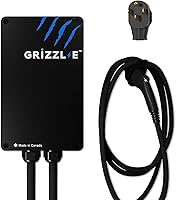
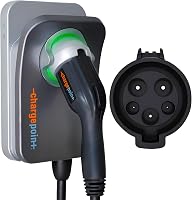
How Much Is a ChargePoint Home Charger?
A ChargePoint Home charger is a premium-priced Level 2 unit, and the plug-in NEMA 14-50 version costs less to install than the hardwired one because it uses an existing outlet. Add the hardware cost, the electrician's labor, and any panel or wiring work your home needs.
On this page (7 sections)
- How much is a ChargePoint home charger compared with other Level 2 units?
- What do the three ChargePoint Home Flex models cost to choose from?
- Is the plug-in or hardwired ChargePoint cheaper to install?
- What will an electrician and wiring add to the cost?
- What can push your ChargePoint install bill up?
- How do the app and network features affect what you pay for?
- How do you pick the ChargePoint model that fits your budget?
A ChargePoint Home charger is a premium-priced Level 2 unit, and the plug-in NEMA 14-50 version costs less to install than the hardwired one because it uses an existing outlet. Your real total is the hardware plus the electrician's labor and any panel or wiring work.
This guide breaks down how much a ChargePoint home charger costs to buy and to install.
The charger is only part of the bill. The install and the circuit decide the rest, so plan for both before you order.
How much is a ChargePoint home charger compared with other Level 2 units?
A ChargePoint Home Flex sits in the mid to premium range for Level 2 home chargers. It's priced above basic cable-in-a-box units and in line with other smart chargers from well-known brands.
That price buys a UL-certified unit with a 23-ft cable, WiFi app control, and indoor/outdoor rating. ChargePoint has three Home Flex versions, so the sticker you pay depends on which one fits your car and garage.
The hardware is rarely the largest line on your bill. Electrician time and wiring often cost as much or more, so a slightly cheaper charger isn't always the cheaper job.
If you're still comparing brands, our guide to the best EV charger for home sets out the main options by need.
What do the three ChargePoint Home Flex models cost to choose from?
The plug-in 14-50 model, the hardwired J1772 model, and the hardwired NACS model are your three choices, and they differ in connector type and how they get wired. That difference drives both the hardware price and the install price.
Pick by your car first. Most non-Tesla EVs before 2025 use J1772, while Teslas and many newer EVs use NACS.
ChargePoint says to check your owner's manual before ordering.
Then pick by your garage. A 240V outlet makes the plug-in model the simple route, while a dedicated circuit run lets the hardwired model reach its full amperage.
Here's who each one suits.
Which ChargePoint model suits a typical garage?
The ChargePoint HomeFlex NEMA 14-50 Charger is the one to start with for most people. It plugs into a 240V outlet with a 14-50 receptacle and needs a 40A or 50A circuit.
Its J1772 connector works with all non-Tesla EVs and needs an adapter for a Tesla. The setup suits renters and anyone whose garage already has the outlet.
Its 23-foot cable gives you some slack for parking, and the unit is rated for indoor or outdoor mounting.
When does the hardwired J1772 model make sense?
Choose the ChargePoint HomeFlex 50A Hardwired Charger if you want the fastest charge and a cleaner wall. Hardwiring skips the outlet and runs the cable straight to a breaker.
It uses the same J1772 connector, so it fits non-Tesla EVs and takes an adapter for a Tesla. This is the model to pick when you're having new wiring run anyway.
With no outlet to buy and no plug to weather, the wall stays tidier, and the amperage is set to match your panel at install time.
Who needs the NACS version?
The ChargePoint HomeFlex NACS Hardwired Charger is built for Tesla and other NACS cars. You skip the adapter and plug straight into the Tesla connector.
It's also the model to watch if you're buying a 2025 or newer EV with a NACS port. Tesla owners comparing brands can read our Tesla charger for home guide before deciding.
A 3 year warranty covers this version, so the hardware cost includes a longer support period than a basic unit.
Is the plug-in or hardwired ChargePoint cheaper to install?
The plug-in model is usually the cheaper install because the electrical work stops at the outlet. If your garage already has a 14-50 receptacle on a suitable circuit, the job is mostly plugging in and setting up the app.
The hardwired model needs a dedicated circuit run from your panel, which means more wire, more time, and usually a higher labor bill. ChargePoint says the hardwired version offers the fastest charge at up to 50A, while the NEMA versions provide up to 40A.
Work out the circuit cost before you choose. A garage with no 240V outlet at all will pay for a new circuit either way, so the plug-in advantage shrinks.
How does your car's connector change the install plan?
The connector decides which model you can buy, and that in turn decides the wiring. A J1772 car rules out the NACS model, and a Tesla is easiest with NACS but can use J1772 with an adapter.
ChargePoint's own note is to check your owner's manual before ordering. If you already own a 14-50 outlet and a J1772 car, the plug-in model is the shortest path to charging.
If you drive a Tesla and want no adapter, plan for the hardwired NACS unit and the circuit that goes with it.
What will an electrician and wiring add to the cost?
Electrician labor and wiring are the biggest variable, and no single figure covers every home. ChargePoint says installation by a licensed electrician is required to get breaker and wire sizing right.
Twelve inches of drywall between the panel and the mounting spot is a very different job from a detached garage that needs a long run. Panel capacity matters too: if your panel is full, adding a double-pole breaker may need more work.
Get a quote that lists the circuit, the breaker, the wire run, and any drywall repair. Ask whether the quote includes the permit where your area requires one.
What does the electrician need to know before quoting?
Tell the electrician which model you picked and what circuit it needs. The plug-in unit wants a 40A or 50A circuit at the 14-50 outlet.
The hardwired versions connect straight to a breaker, so the quote should name the breaker size and the wire gauge for the run.
Mention the mounting spot and how far it sits from the panel, since cable length drives labor. Also say whether the wall is finished or open, because that changes how the wire gets routed.
A clear list like this keeps the quote close to the final bill.
What can push your ChargePoint install bill up?
Panel upgrades and long cable runs are the two costs that move the bill most. Both are electrical work, not charger features, so they hit any brand the same way.
A detached garage, a finished wall, or a run that crosses concrete all add labor. So does an older panel that has no room for another breaker.
If your service can't carry the new circuit, the electrician may need to free up capacity or upgrade the panel, and that work sits outside the charger's price.
The cable shipped with the charger is 23 ft, which helps if the mounting spot is near the car. A long distance to the panel is the part you can't shorten with the charger.
A cold-resistant cable also means the unit is rated for outdoor mounting, so you aren't forced to pay for a garage spot if the driveway is the practical place to charge.
How do the app and network features affect what you pay for?
The ChargePoint app and network access come with the charger, so you aren't paying a separate hardware cost for them. The app controls the charger, sets reminders, connects to smart home devices, and tracks charging data.
ChargePoint says its network includes 274k+ stations across North America and Europe and 565k+ roaming partner stations. That network access is part of the brand's package rather than a yearly hardware fee.
The app also works with Apple CarPlay and Android Auto, so station info shows on the car screen while you're out.
You still need WiFi for some app features and troubleshooting, so a weak garage signal can affect setup. Keep that in mind if your router sits far from the car.
How do you pick the ChargePoint model that fits your budget?
Start with your connector and your wiring, then compare the total job, not just the charger. The right model is the one whose install fits your garage.
If your garage has a 14-50 outlet, the plug-in HomeFlex is the value pick because the wiring is already done. If you're running new wire, the hardwired J1772 model gives you the full 50A.
Tesla and NACS owners should go straight to the NACS hardwired version.
Our level 2 charger for home guide explains amps and plugs in more detail. When you've settled the wiring, read the ChargePoint Home Flex EV charger review for the full feature walkthrough.
The final answer to how much a ChargePoint home charger costs is your hardware choice plus a professional install. Budget for the charger, the circuit, and a licensed electrician, and pick the model that matches your car and your panel.
Frequently asked questions
How much is a ChargePoint Home charger in total?
Budget for the charger itself plus electrician labor and any wiring or panel upgrades. The plug-in Home Flex is the cheaper install because it uses a 240V outlet, while the hardwired version needs a dedicated circuit run.
Do I need an electrician to install a ChargePoint Home Flex?
Yes. ChargePoint says to use a licensed electrician so the breaker and wire sizing are right and the charger's amperage matches your panel and your car.
That labor is a real part of your total cost.
Is the plug-in or hardwired Home Flex cheaper to install?
The NEMA 14-50 plug-in model is usually cheaper to wire because a 240V outlet may already be in your garage. The hardwired model needs a direct circuit, which means more electrician work but no outlet to buy.
Does a ChargePoint charger work with a Tesla?
The J1772 models charge a Tesla with an adapter. The NACS hardwired model has the Tesla connector built in, so you can plug straight in without one.
What should I check before buying a ChargePoint Home Flex?
Confirm your panel has capacity for a 40A or 50A circuit and decide whether you want a plug-in or hardwired setup. Also match the connector to your car: J1772 for most non-Tesla EVs, NACS for Tesla.