Do You Need a J1772 to Tesla Adapter?
A J1772 to Tesla adapter connects a Tesla with a NACS port to a compatible J1772 Level 1 or Level 2 AC charger. Choose one for access to J1772 charging, but use a different adapter for CCS fast charging.
On this page (8 sections)
- What does a J1772 to Tesla adapter do?
- When would you need a J1772 adapter?
- What should you check before buying a J1772 to Tesla adapter?
- Which J1772 to Tesla adapter should you choose?
- Can you use an adapter with a J1772 home charger?
- How should you set up and care for an adapter?
- What mistakes should you avoid?
- Which J1772 to Tesla adapter do you need?
A J1772 to Tesla adapter connects a Tesla with a NACS port to a compatible J1772 Level 1 or Level 2 AC charger. It helps you use more AC charging locations, but it does not provide CCS fast charging.
The adapter fits between the J1772 charging connector and your Tesla's charge port. It can be useful at work, at a hotel, at a public charging station, or with a J1772 home charger.
What does a J1772 to Tesla adapter do?
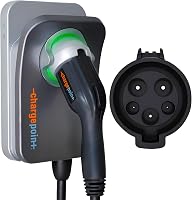
A J1772 to Tesla adapter connects a J1772 AC charging plug to a Tesla NACS port. J1772 is common on North American AC chargers, while Tesla vehicles use the NACS port.
The adapter changes the connector fit. It doesn't create power, increase the charger's output, or make a charger compatible with every charging standard.
For a quick overview of the Tesla connector, see what NACS is and how the Tesla plug works. If you are comparing connector types for AC and fast charging, our guide to J1772 vs CCS explains the difference.
Is a J1772 to Tesla adapter the same as a CCS adapter?
No. J1772 adapters are for AC charging, while CCS is a separate connector used for DC fast charging.
The Lectron and FOCSPROD adapters below are specified for Level 1 and Level 2 charging. Neither is meant for a CCS fast charger.
When would you need a J1772 adapter?
You need one when the charger has a J1772 connector and your Tesla has a NACS port. If the charger already has a Tesla-compatible connector, you don't need this adapter for that connection.
Public Level 2 stations are one reason to carry an adapter. You may also need one for a J1772 home charger, depending on your car and the equipment that came with it.
Check your Tesla's delivery items and manual before you buy. Included adapters can vary, and a spare only helps if it matches the charging connection you plan to use.
If you're choosing equipment for home, our guide to Level 2 chargers for Tesla explains charger and installation choices to consider before selecting an adapter.
Can you use a J1772 adapter with a home charger?
Yes, if the home charger has a J1772 connector and the adapter is compatible with your vehicle. A Tesla home charger with a Tesla connector does not need a J1772 adapter.
The Lectron adapter is specified for Tesla vehicles and EVs in the NACS alliance, and supports up to 80A and 240V. Those figures describe the adapter's capacity, not the charge rate you'll get in every setup.
If you're still deciding what to install, start with Level 2 charger options for home. The adapter only addresses the connector, so it doesn't replace planning for the charger, circuit, and installation.
What should you check before buying a J1772 to Tesla adapter?
Check your vehicle's charge port, the charger's connector, and the charging type. Those three details tell you whether an adapter will work for your planned connection.
- Confirm the vehicle port. Check your Tesla's charge port and manual, and make sure the adapter is specified for your model.
- Confirm the charger plug. It needs to be J1772. A CCS plug or a connector that already fits your Tesla calls for a different choice.
- Confirm the charging type. The adapters in this guide are for Level 1 or Level 2 AC charging.
- Compare capacity and instructions. An adapter's stated capacity does not guarantee that your car or charging station can use that much power.
- Check the adapter's condition. Don't use one with cracked housing, bent pins, or other visible damage.
If you regularly charge at a particular workplace, hotel, or public station, check its connector type before you rely on an adapter. Some locations have more than one charging option, and the plug you use determines what equipment you need.
A higher amp number on an adapter doesn't mean your car will charge at that rate. The vehicle's onboard charger and the station's available power also limit AC charging speed.
Does an 80A adapter mean 80A charging?
No. An 80A rating is an adapter capacity figure, not a guarantee that your Tesla or the station will deliver 80A.
The vehicle, charger, and circuit each affect the charging rate. FOCSPROD notes that a vehicle's maximum AC charging power can limit the rate even at a more powerful station.
If you want to understand what determines charging time, see how long it takes to charge an EV at home.
Which J1772 to Tesla adapter should you choose?
The Lectron and FOCSPROD adapters both support Level 1 and Level 2 AC charging and have a stated capacity of up to 80A. Choose by vehicle fit, the specific features you value, and the maker's instructions.
Lectron is a clear fit if you want an adapter specified for all Tesla models and EVs in the NACS alliance, plus a stated IP67 weatherproof rating. It also has TUV and UL 2251 certifications.
FOCSPROD suits buyers whose Tesla model appears in its compatibility details and who value its stated limited warranty. Its adapter is specified for Tesla Model 3, Y, X, S, and Cybertruck, and has SGS certification to the UL 2252 standard.
For either option, read the instructions for your exact model and use. Don't pick by the amp rating alone, and don't assume one adapter works with DC fast charging just because it fits a Tesla port.
Can you use an adapter with a J1772 home charger?
Yes, a compatible adapter can connect a Tesla to a J1772 home charger. The charger itself still needs to fit your home's electrical setup and your vehicle's charging needs.
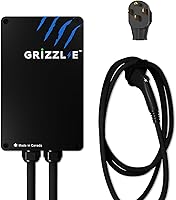
The Grizzl-E Classic is a J1772 Level 2 charger with a NEMA 14-50 plug, a 24 ft cable, and adjustable 16A, 24A, 32A, or 40A output. It's a home charger to consider if you want a J1772 unit that plugs into a matching outlet.
Before choosing a plug-in unit, check the outlet and circuit details with an electrician. See which outlet a Level 2 EV charger needs for more on matching a charger to an available outlet.
A hardwired charger is another route. The EVIQO charger delivers up to 48A on a dedicated 60A, 240V circuit and requires professional installation.
Choose a home charger based on its connector and your electrical plan. If the charger is J1772, confirm whether your Tesla needs an adapter; the adapter doesn't change installation requirements.
How should you set up and care for an adapter?
Set up the connection according to the vehicle and adapter instructions: attach the adapter to the J1772 connector, then connect it to the vehicle as directed. Make sure the parts seat fully and the connection feels secure before charging.
Use an adapter only for the charging type it supports. These J1772 adapters are intended for AC charging, so don't connect one to a CCS fast charger or try to force a plug that doesn't fit.
Keep the adapter in a clean, dry place when it isn't in use. Before each charge, check for visible damage and debris around the connectors, and follow the maker's directions for cleaning and weather exposure.
For outdoor charging, use equipment only as its instructions allow. Lectron specifies an IP67 rating for its adapter, but that doesn't guarantee the weather rating of the charging station, cable, or every part of the connection.
What mistakes should you avoid?
The most common mistake is treating a J1772-to-Tesla adapter as a universal charging converter. It only connects compatible J1772 AC equipment to a vehicle with the matching port.
Other mistakes can lead to the wrong purchase or an unreliable connection:
- Buying before checking your car's kit. You may already have a suitable adapter.
- Confusing J1772 with CCS. They're used for different types of charging, and this adapter is not for CCS fast charging.
- Expecting the adapter to increase speed. It doesn't raise the power limit of your car, charger, or circuit.
- Choosing by the amp number alone. Confirm vehicle fit and charging use as well as capacity.
- Ignoring damage or a poor fit. Don't force the connector or charge with equipment that has visible damage.
If a plug won't seat as intended, stop and check the instructions and connector type. A compatible adapter should connect without force.
Which J1772 to Tesla adapter do you need?
Choose a J1772 to Tesla adapter if you want to use J1772 Level 1 or Level 2 AC stations and your Tesla needs a NACS connection. Consider Lectron if its stated compatibility and weather rating suit your plans; consider FOCSPROD if its compatibility details and stated warranty fit your preferences.
Skip an adapter if your usual charger already fits your Tesla, you have a suitable one in your car's included equipment, or your goal is CCS fast charging. For home charging, compare Level 2 chargers for Tesla owners first, then choose an adapter only if the charger's J1772 connector calls for one.
Frequently asked questions
Do Teslas come with a J1772 adapter?
Some Tesla vehicles include a J1772 adapter, but included equipment can vary by model and purchase. Check your car's delivery items and owner's manual before buying another one.
If you already have an adapter, make sure it is intended for J1772 AC charging and has no visible damage.
Can a J1772 to Tesla adapter be used with a Tesla Supercharger?
No. A J1772 to Tesla adapter is for J1772 AC charging, including compatible Level 1 and Level 2 stations.
It does not convert a CCS or other DC fast charger connection for Tesla use.
Use the fast charging access and adapter intended for your vehicle and station.
Will a J1772 adapter make charging faster?
No. The adapter connects the charger to your car, but it doesn't raise the power available from the station or the car's onboard charger.
Charging speed is limited by the lowest capacity in the setup, including the vehicle, charger, circuit, and adapter.
Can I leave a J1772 to Tesla adapter outdoors?
Follow the adapter maker's instructions for outdoor use, weather exposure, and storage. A weather rating on one adapter does not make every connector or charging station weatherproof.
Keep the connection clean and dry as directed, and don't use equipment with visible damage.