J1772 vs CCS: Which Plug Does Your EV Use? (October 2026)
J1772 is the AC charging connector; CCS adds two large pins for DC fast charging. Many non-Tesla EVs use a J1772 port for home charging and a CCS port for fast charging, but check your vehicle’s manual because ports vary by model and year.
On this page (8 sections)
J1772 is the AC charging connector; CCS adds 2 large pins for DC fast charging. Many non-Tesla EVs use J1772 for home charging and CCS for public fast charging, but connector support varies by vehicle, model year and market.
The short version: J1772 handles AC charging, including many home Level 2 chargers. CCS supports DC fast charging through the extra pins below the J1772-shaped section.
This doesn't mean every EV has 2 separate ports. A CCS inlet can accept a J1772 connector for AC charging, while some vehicles have different port layouts or connector standards.
J1772 vs CCS: what is the difference?
J1772 is an AC connector; CCS is a combined connector that adds DC fast charging pins. Look at the charge port and your owner's manual to confirm what your specific EV supports.
A J1772 plug has a rounded shape with 5 contacts. It carries AC power, which the car's onboard charger converts for the battery.
CCS Combo 1, often called CCS1 in North America, uses the J1772-shaped section at the top and adds 2 large contacts beneath it. Those added contacts carry DC power directly to the battery during compatible fast charging.
The connector shape tells only part of the story. Charging speed also depends on the car, the charging equipment and the power available at that location.
What does the CCS plug add to J1772?
The 2 large pins let a CCS1 connector supply DC power without routing it through the car's onboard AC charger. That's why CCS fast charging can add range more quickly than ordinary AC charging when the vehicle and station support it.
A CCS inlet accepts a J1772 connector in its upper section for AC charging. A J1772-only inlet does not have the extra openings needed for the CCS DC pins.
Is CCS the same as Level 3 charging?
CCS is a connector standard, while Level 3 is a common informal name for DC fast charging. People often use the terms together because CCS stations can deliver DC fast charging, but the connector and the charging level describe different things.
For more on the charging levels, see our guide to Level 2 vs Level 3 EV chargers. It explains the practical difference between home AC charging and public DC fast charging.
Which plug does your EV use?
Check the port label, owner’s manual or manufacturer support page for the exact model year. A brand name alone may not tell you which connector your car has.
Many non-Tesla EVs sold in North America use J1772 for AC charging and CCS1 for DC fast charging. The same car may have one CCS inlet that supports both, rather than separate ports.
Some models, years or markets use other connector types. Newer vehicles may use NACS, and a model name that stayed the same over time may have changed connectors between model years.
If the connector area is hard to identify, compare the openings in your car’s inlet with the manual’s charging diagram. Our guide to NACS and the Tesla plug covers that connector and how it differs from J1772 and CCS.
J1772 vs CCS port check
A J1772-only inlet has the upper connector openings without the 2 large openings beneath them. A CCS1 inlet has the J1772-shaped upper part plus those 2 larger lower openings.
Don’t rely on a photo from a different trim or model year. The charging port on the car in front of you, along with the manual for that exact car, is the useful reference.
Can a CCS car use a J1772 charger at home?
Yes, a CCS car can generally use a J1772 AC charger when the connector fits its inlet and the car supports AC charging. The car will charge at the limit set by the vehicle and the charger.
A CCS inlet includes the J1772-shaped upper portion. That allows a J1772 home charger to connect for AC charging, while leaving the lower DC pins unused.
A home charger does not become a CCS fast charger because it plugs into a CCS car. It still supplies AC power, and the car’s onboard charger determines how much AC power it can use.
The Level 2 charger for home guide explains how amperage, circuit capacity and the vehicle’s charging limit affect a home setup. If you’re comparing charging time, see how long it takes to charge an EV at home.
Can a J1772-only EV use a CCS fast charger?
No, a J1772-only inlet lacks the 2 lower contacts that a CCS connector needs for DC fast charging. An adapter cannot add DC fast-charging capability that the vehicle does not support.
Some public charging sites offer AC charging alongside DC fast chargers. A J1772-only car may be able to use a compatible AC connector there, but it can't use the CCS DC connection.
Check the station’s connector information before driving there. A site that has a CCS plug may not have a separate J1772 option.
Do you need an adapter between J1772 and CCS?
Usually, no adapter is needed for a CCS vehicle to use a J1772 AC charger. The CCS inlet already accepts the J1772-shaped connector section.
A J1772-to-CCS adapter does not turn a J1772-only car into a CCS fast-charging car. Adapter support depends on the car, adapter and charging equipment, so confirm compatibility with the vehicle maker before buying anything.
Tesla drivers may need a J1772 adapter to use a J1772 charger, depending on their vehicle and included equipment. Our guide explains when a J1772-to-Tesla adapter is needed.
Before ordering an adapter, check the car’s model year, port type and the charging source you plan to use. An adapter that solves an AC connection does not necessarily work for DC fast charging.
Which home charger fits a J1772 EV?
Choose a J1772 home charger when your car supports that connector and the charger’s electrical setup fits your home. Match the charger's output to your vehicle’s onboard charging limit and the circuit an electrician can install.
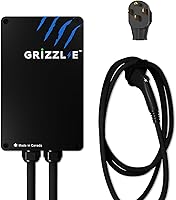
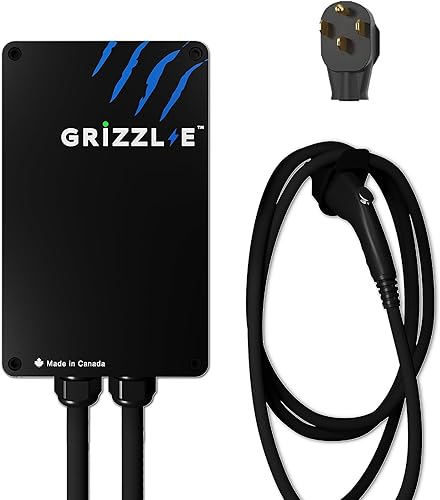
A plug-in charger can be a fit when you have a compatible 240V outlet. The Grizzl-E Classic supports 16A, 24A, 32A or 40A output, with the circuit breaker size matched to the selected setting.
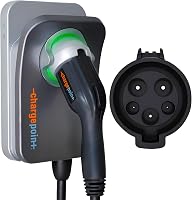
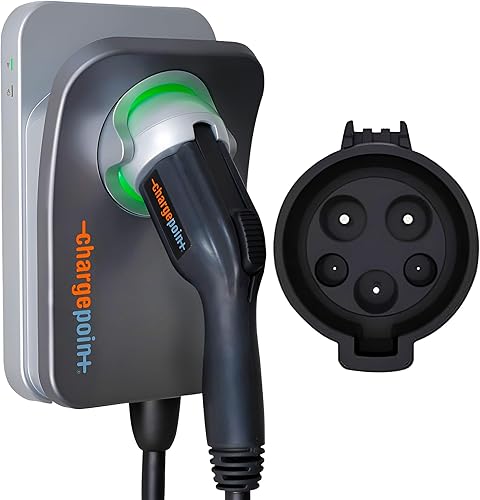
The ChargePoint HomeFlex is hardwired and adjustable from 16A to 50A. ChargePoint says it works with non-Tesla EVs through J1772, while Tesla drivers need an adapter.
The EVIQO charger delivers up to 48A on a dedicated 60A, 240V circuit, and its app functions require 2.4 GHz Wi-Fi. A licensed electrician should install it.
These are AC home chargers, not CCS DC fast chargers. For the broader buying decision, compare your electrical panel, outlet or hardwired options in our home EV charger guide.
Which should you choose, J1772 or CCS?
Use J1772 for compatible AC charging and CCS for DC fast charging when your car supports it. If you are choosing a home charger, the J1772 connector is the key fit for many non-Tesla EVs in North America.
Pick a J1772 home charger if it matches your vehicle and electrical setup. Pick a CCS station for faster public charging only if your EV has a compatible CCS inlet.
Before buying, confirm the port on your exact vehicle and whether the charging session is AC or DC. Then choose equipment that matches both.
Sources
Frequently asked questions
Is J1772 the same as CCS?
No. J1772 is an AC charging connector, while CCS combines a J1772-shaped upper section with 2 additional large pins for DC fast charging.
A vehicle may have separate AC and DC ports, or a single CCS inlet that accepts both connector types.
Check your manual for your specific car.
Can a J1772 charger charge a CCS car?
A J1772 charger can provide AC charging to a vehicle with a CCS inlet, because the upper part of the CCS inlet accepts a J1772 connector. It will charge at the rate supported by the charger and vehicle, not at DC fast-charging speed.
Can I use a CCS charger with a J1772-only car?
A J1772-only car cannot use the CCS DC fast-charging pins because it lacks a CCS inlet. It may use an AC connector at a compatible public station if the station offers one, but check the station details and your vehicle manual before going.
Does a Tesla use J1772 or CCS?
Tesla connector support depends on the model, year and market. In North America, Tesla vehicles have used Tesla-style connectors, and some can charge from J1772 equipment with an adapter.
Check your manual and charging port before buying an adapter or charger.
Do I need a CCS adapter for home charging?
Usually, no. Home Level 2 chargers commonly use J1772 for non-Tesla EVs, and a car with a CCS inlet can accept that AC connector at home.
You need to confirm your car's port and any adapter requirements, especially if you own a Tesla or a newer model.