Emporia 48 Amp Level 2 EV Charger Review: Worth It? (October 2026)
This Emporia EV charger review finds the 48A hardwired J1772 model a good fit for a fixed home charging spot with compatible wiring and a J1772 vehicle. Choose the Emporia Pro if you also need PowerSmart load balancing.
On this page (12 sections)
- Emporia EV charger review: who should buy the 48A model?
- Is 48 amps enough for home EV charging?
- What does the Emporia app add to charging?
- Will the J1772 connector fit your EV?
- What installation does the Emporia 48A require?
- How should you set up and care for the charger?
- How does the Emporia compare with other home chargers?
- Is the Emporia 48A better than the Emporia Pro?
- When is ChargePoint HomeFlex a better fit?
- When is a plug-in charger a better choice?
- What mistakes should you avoid when choosing an Emporia charger?
- Is the Emporia 48 Amp Level 2 EV Charger worth considering?
The Emporia EV charger review answer is straightforward: the 48A hardwired J1772 model fits a fixed home charging spot when your vehicle uses J1772 and your electrical system supports the installation. It adds Wi-Fi scheduling and energy data, plus a 25 ft cable.
The main choice is between this standard model, the Emporia Pro with PowerSmart load balancing, and alternatives with different apps or connection styles. Match the charger to your vehicle port, electrical plan, parking layout and preferred charging routine.
Emporia EV charger review: who should buy the 48A model?
Choose the Emporia 48A if you want a permanently installed Level 2 charger with scheduled charging, energy tracking and a J1772 connector. It is a strong fit for drivers who park near a planned hardwired charging point and can use the app through their home Wi-Fi.
Emporia 48A Hardwired J1772 Charger: Best for scheduled home charging

- Up to 48A hardwired charging
- 25 ft cable
- 2.4 GHz Wi-Fi app
- J1772 connector
A hardwired home charger with Wi-Fi scheduling and real-time energy data. It fits drivers whose EV uses J1772 and whose electrical setup supports a hardwired installation.
Pros
- Supports up to 48A when hardwired
- 25 ft cable
- Wi-Fi app supports schedules and energy data
- UL listed and ENERGY STAR certified
Cons
- Hardwired installation is not portable
- Professional installation is recommended
- J1772 connector requires an adapter for a NACS port
Skip this configuration if you need to unplug the charger regularly, want an included panel load-balancing system, or have a vehicle with a NACS port and do not want an adapter. Emporia offers other configurations, so confirm the connector and installation style for the exact version you choose.
Hardwiring also means planning the electrical work before mounting the unit. Emporia recommends professional installation, so this is not the right choice if you expect to plug it into an ordinary household outlet and start charging.
What does the Emporia 48A charger include?
The Emporia includes the charger, wall mount, handle holster, mounting hardware and a 25 ft cable. Its 2.4 GHz Wi-Fi connection supports schedules and real-time energy data in the mobile app.
Emporia says the hardwired charger can provide up to 46 miles of range per hour. That is a maximum claim, not a promise for every car or session; vehicle charging limits and conditions affect the actual rate.
Is 48 amps enough for home EV charging?
A 48A charger is useful when the car can accept that power and the home circuit is built for it. The number on a charger alone does not determine how quickly your battery will charge.
Your vehicle's onboard charging limit, battery size, starting charge level and temperature all affect charging time. For many drivers, the practical question is whether the car can replace its daily driving energy while parked, not whether the charger reaches its maximum output.
Ask an electrician to confirm the circuit and panel before you buy a hardwired charger. For a closer look at circuit and output trade-offs, read our guide to 40 amp vs 48 amp EV chargers.
What does the Emporia app add to charging?
The Emporia app lets you schedule charging sessions and review energy use through a 2.4 GHz Wi-Fi connection. Scheduling can help you use off-peak hours if your utility offers a time-based rate.
The app is most useful when you want to set a routine and check energy use from your phone. Confirm that Wi-Fi reaches the planned charger location before installation, especially if the garage is far from your router.
If your main reason for buying a smart charger is its app, compare the features you will actually use. Our guide to choosing a smart EV charger covers schedules, connectivity and other buying questions.
Will the J1772 connector fit your EV?
The reviewed Emporia model has a J1772 connector, so it fits vehicles with a J1772 charge port. A vehicle with a NACS port needs a compatible adapter or a charger version with the matching connector.
Check the port in your vehicle manual before ordering, even if the charger’s output looks right. Connector fit and charging power are separate questions.
Our J1772 to Tesla adapter guide explains when an adapter is needed. You can also read what NACS means for EV charging if you are comparing newer vehicle ports.
What installation does the Emporia 48A require?
This Emporia comes preconfigured for hardwiring with a whip, and professional installation is recommended. Have an electrician review the panel, circuit, cable path and local requirements before the installation date.
The hardwired setup supports up to 48A. Emporia says its NEMA 14-50 version is limited to 40A, and recommends hardwiring when a home's panel has GFCI breakers because an upstream GFCI breaker may cause nuisance trips with the charger's built-in GFCI protection.
Do not assume an existing outlet is suitable because the plug fits. The outlet and circuit must be appropriate for continuous EV charging; our EV charger outlet guide explains what to discuss with an electrician.
How should you set up and care for the charger?
Start by choosing a mounting point that lets the cable reach the vehicle's charge port without crossing a walking path or driveway. Measure the full cable route, including turns around stored items or the car, before committing to a location.
After the electrician mounts and connects the charger, connect it to 2.4 GHz Wi-Fi and set the schedule in the app. Keep the handle in its holster when it is not connected, and return the cable to its intended storage position so it is not driven over or left where people can trip on it.
Before each session, make sure the connector is seated securely in the vehicle's port. If charging does not start, check the schedule, app connection and vehicle charge settings before changing electrical settings or repeatedly reconnecting the plug.
How does the Emporia compare with other home chargers?
The standard Emporia combines hardwired charging with Wi-Fi schedules and energy data. The alternatives here differ in app, load management and whether the charger uses a plug-in connection.
| Charger | Connection | Maximum output | Cable | Notable feature |
|---|---|---|---|---|
| Emporia 48A Hardwired J1772 Charger | Hardwired | 48A | 25 ft | Wi-Fi scheduling and energy data |
| ChargePoint HomeFlex 50A Hardwired Charger | Hardwired | Adjustable up to 50A | 23 ft | ChargePoint app controls |
| Emporia Pro 48A Hardwired Charger | Hardwired | 48A | 25 ft | Vue monitor and PowerSmart load balancing |
| Grizzl-E Classic 40A NEMA 14-50 Charger | NEMA 14-50 plug | 40A | 24 ft | Adjustable amperage |
The best 48 amp EV chargers guide compares more chargers in this output class. For options across different charging setups, see our best EV chargers for home use.
Is the Emporia 48A better than the Emporia Pro?
The standard Emporia is the better match when hardwired charging and app scheduling cover your needs. The Pro adds a Vue Home Energy Monitor and PowerSmart software that balances charging load with the existing electrical panel.
Emporia Pro 48A Hardwired Charger: Best for limited electrical service

- 48A hardwired charging
- PowerSmart load balancing
- Vue Home Energy Monitor
- 25 ft cable
The Pro combines a hardwired 48A charger with a Vue Home Energy Monitor and PowerSmart software. Consider it when automatic load balancing with your existing panel matters.
Pros
- PowerSmart balances load with the existing electrical panel
- Vue monitor is included
- App supports schedules and real-time usage tracking
- 25 ft cable
Cons
- Professional installation is recommended
- J1772 connector requires an adapter for a NACS port
- Its added energy monitoring may be unnecessary for a simpler setup
Choose the Pro if your electrical service is limited and your electrician confirms that PowerSmart load balancing fits your home. It also makes sense if you want the included monitor for a broader view of home energy use.
Choose the standard Emporia if you do not need those additions. Both models in this review use J1772.
Check connector and installation options when comparing other Emporia versions. Our Emporia Pro vs Emporia Classic comparison explains their differences.
When is ChargePoint HomeFlex a better fit?
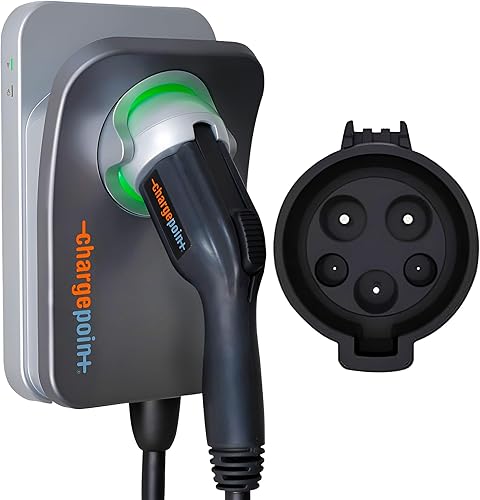
ChargePoint HomeFlex suits drivers who want adjustable output up to 50A and prefer the ChargePoint app. It uses J1772, has a 23 ft cable and can be installed indoors or outdoors by an electrician.
ChargePoint HomeFlex 50A Hardwired Charger: Best for ChargePoint app users
- Adjustable 16–50A
- Hardwired installation
- J1772 connector
- Indoor or outdoor installation
A hardwired J1772 alternative with adjustable output up to 50A and app controls. Check your vehicle, circuit and installation requirements before choosing its higher maximum setting.
Pros
- Adjustable output from 16A to 50A
- 23 ft cable
- App controls and reminders
- Rated for indoor or outdoor installation
Cons
- Professional installation is recommended
- Tesla vehicles need an adapter
- Wi-Fi is needed for some features and troubleshooting
The app includes charger controls, reminders, smart home connections and charging information. Wi-Fi is needed for some features and troubleshooting, so check the signal where the unit will sit.
Its higher maximum setting does not mean every vehicle will charge faster than with the Emporia. Confirm your car's charging limit and have the electrician set up the circuit for your intended output.
When is a plug-in charger a better choice?
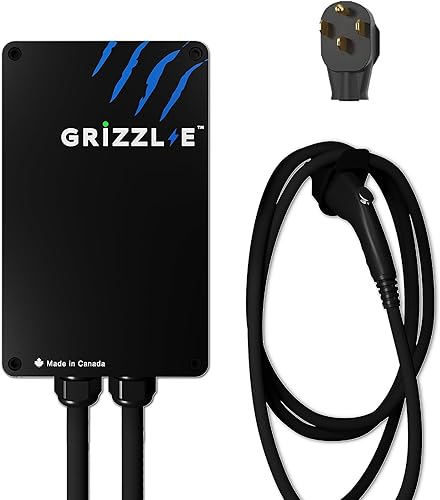
The Grizzl-E Classic fits drivers who already have a suitable NEMA 14-50 outlet and want a charger they can unplug. Its adjustable output reaches 40A, and its cable is 24 ft.
Grizzl-E Classic 40A NEMA 14-50 Charger: Best for movable plug-in charging
- Up to 40A
- NEMA 14-50 plug
- 24 ft cable
- Adjustable amperage
A plug-in option for drivers with a suitable NEMA 14-50 outlet who prefer a charger that can be unplugged. Its maximum output is lower than the hardwired Emporia.
Pros
- NEMA 14-50 plug
- Adjustable output from 16A to 40A
- 24 ft cable
- Indoor and outdoor use
Cons
- Maximum output is 40A
- Requires a suitable 50A circuit for 40A charging
- No Wi-Fi app features are specified
Choose it when plug-in convenience matters more than Wi-Fi scheduling or a 48A maximum. Skip it if you need app-based energy tracking or your daily charging routine calls for more output than its 40A maximum.
A plug that fits does not prove an outlet is suitable for EV charging. Confirm the outlet and circuit rating, and have an electrician check older or uncertain wiring before regular use.
What mistakes should you avoid when choosing an Emporia charger?
The most common buying mistake is choosing by amperage before checking the vehicle port and electrical setup. Confirm the connector, circuit capacity and planned installation type first.
Also avoid assuming the advertised range-per-hour figure will match your car. The vehicle's onboard charging limit can cap the rate, and daily needs depend on how much you drive and how long the car stays parked.
A third mistake is overlooking cable reach or Wi-Fi coverage. Measure to the charge port with the car parked in its normal spot, and check the network at the intended mounting point if you want schedules and energy tracking.
Is the Emporia 48 Amp Level 2 EV Charger worth considering?
The Emporia 48A is a good pick for a fixed J1772 home charging spot when your electrician confirms a suitable hardwired circuit and you want Wi-Fi scheduling. Choose the Pro if PowerSmart load balancing and the Vue monitor address a real need in your home.
Choose ChargePoint HomeFlex if its adjustable output and app suit your routine, or the Grizzl-E if you want a plug-in unit and already have the right outlet. This Emporia EV charger review comes down to a simple rule: match connector and electrical setup first, then choose the app and extra features you will use.
Compare other setups in our Level 2 charger guide for home.
Frequently asked questions
Is the Emporia 48 amp EV charger hardwired?
The Emporia 48A Hardwired J1772 Charger comes preconfigured for hardwired installation with a whip. Emporia recommends professional installation, and your electrician should confirm that the circuit and panel support the intended setup before installation.
What connector does the Emporia 48A charger use?
This Emporia charger uses a J1772 connector, which fits EVs with a J1772 charge port. A Tesla or another vehicle with a NACS port needs a compatible adapter; check your vehicle's port and manual before ordering.
Can the Emporia 48 amp charger schedule charging?
Yes, its 2.4 GHz Wi-Fi connection lets you manage charging and schedule sessions through the mobile app. You can also view real-time energy data, which may help you set charging around your utility's off-peak hours.
Should I choose the Emporia charger or Emporia Pro?
Choose the standard Emporia if you want a 48A hardwired charger with Wi-Fi scheduling and energy data. The Pro adds a Vue Home Energy Monitor and PowerSmart load balancing, which may suit a home with limited electrical service; compare both in our Emporia Pro vs Emporia Classic guide.