How to Choose a Smart EV Charger
Choose a smart EV charger that matches your car’s connector and home circuit, then compare hardwired or plug-in installation, app controls, schedules and the cable length you need.
On this page (8 sections)
- What should you check before choosing a smart EV charger?
- Which smart features are useful for home charging?
- Should you choose hardwired or plug-in?
- How do connector and cable choices affect the fit?
- Which smart EV charger fits your setup?
- How do you compare charging rate and home cost?
- What should you confirm before buying?
- How do you choose the right smart EV charger?
A smart EV charger is worth choosing when its connector, circuit, installation style and app features fit your car and home. Check those basics first, then compare charging schedules, energy data, cable reach and offline operation.
Smart features can help you set a charging time or review charging activity from your phone. They don't make an incompatible plug or undersized home circuit suitable, so start with the car manual and an electrician’s assessment.
For a broader overview of home options, see our home garage chargers guide. This guide focuses on which smart features matter and how to match a charger to your setup.
What should you check before choosing a smart EV charger?
Start with your vehicle’s connector and your home’s electrical capacity. These determine which chargers can connect and how they can be installed.
| Check | What to confirm |
|---|---|
| Vehicle connector | J1772, NACS or whether your vehicle requires an adapter |
| Home circuit | Circuit rating and whether the panel can support the charger |
| Installation | Hardwired connection or a compatible 240V outlet |
| Charging rate | The rate your vehicle and circuit can use |
| Smart controls | App access, scheduling, energy data and notifications |
| Cable reach | Whether the cable reaches the vehicle’s charge port from the planned mount |
Your car may accept less power than a charger can supply. The actual charging rate also depends on the circuit and installation, so a higher amp rating by itself does not promise faster charging.
Check the owner’s manual for the car’s connector and charging limits. Then ask a qualified electrician to assess the planned circuit and installation before buying equipment.
If you're still deciding whether Level 2 charging suits your routine, read what a Level 2 EV charger is. For outlet details, our guide to EV charger outlets explains what to confirm before choosing a plug-in unit.
Which smart features are useful for home charging?
The most useful smart feature is usually one you will use regularly, such as setting a charging schedule or checking charging activity. Compare each charger’s app functions instead of assuming all “smart” models offer the same controls.
Does a smart EV charger need Wi-Fi?
Wi-Fi can enable app features such as schedules, reminders, charging information and remote controls. Some functions may stop working if the charger loses its connection, while basic charging may still be available.
Check whether the charger needs a 2.4 GHz network, whether its app supports your phone and what happens if Wi-Fi goes out. If your garage has weak coverage, factor in the network reach before relying on app controls.
Can an app schedule charging for off-peak hours?
An app schedule can start charging during a time you set. That can be useful if your utility charges less during specific hours, but first confirm the rate plan and schedule behavior with your utility and charger.
Some cars also let you schedule charging. Avoid setting conflicting schedules in both the car and the charger until you understand which control takes priority.
Do you need energy tracking and notifications?
Energy information can help you review charging sessions or estimate how much electricity your EV uses at home. A charging-complete notification can also tell you when the car has reached its target.
These tools are useful if you check them. If you mostly plug in overnight and rarely open an app, simple scheduling may matter more than detailed energy charts.
For smart controls focused on the charger itself, compare options in our best smart EV chargers guide.
Should you choose hardwired or plug-in?
Choose hardwired for a permanent setup or a plug-in charger when your home already has a suitable outlet and the charger supports it. An electrician should confirm the circuit, outlet and installation plan before you buy.
Hardwired models connect directly to a dedicated circuit. They can support higher charging rates than some plug-in versions, depending on the charger, circuit and vehicle.
Plug-in chargers connect to a matching outlet, which can make the unit easier to remove. The outlet must be rated for continuous EV charging; a familiar outlet shape alone does not confirm that it is suitable.
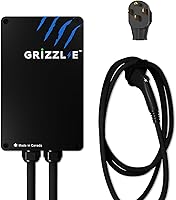
The ChargePoint HomeFlex and Emporia models below are hardwired. The Grizzl-E Classic Connect and AIMILER models use a NEMA 14-50 plug.
If you are comparing circuit sizes, our Level 2 home charger guide covers amps, plugs and what to buy. For more on shared electrical capacity, see EV charger load management.
How do connector and cable choices affect the fit?
Match the charger cable to your car’s inlet, or confirm that a suitable adapter is available. J1772 is common on many non-Tesla EVs, while NACS is used by Tesla and some newer vehicles.
The products in this guide use J1772 connectors. ChargePoint notes that Tesla vehicles require an adapter with this charger, and the other J1772 models also specify an adapter for NACS or Tesla vehicles.
Measure from the planned charger mount to the car’s charge port with the vehicle parked in its normal position. Include a little extra reach for how the cable will hang and move, while keeping it away from walkways and vehicle tires.
A longer cable can make parking easier, but it also needs a place to rest when not in use. Check where the handle and cable will sit before choosing the mounting location.
Our NACS plug guide explains the connector, and J1772-to-Tesla adapter guidance covers when an adapter may be needed.
Which smart EV charger fits your setup?
The right option depends on whether you want a hardwired charger or a plug-in model, along with the app controls and charging rate you need. These four choices have different installation styles and feature sets.
ChargePoint HomeFlex: app features with hardwired installation
The ChargePoint HomeFlex suits drivers who want a hardwired charger with app controls. The ChargePoint Mobile App can manage reminders, connect to smart home devices and show charging information.
The charger has an adjustable 16–50A range and a J1772 connector. ChargePoint says Wi-Fi is needed for certain functions and troubleshooting, so consider garage network coverage if you plan to rely on the app.
For a Tesla or another vehicle with a NACS inlet, confirm adapter compatibility before ordering. A licensed electrician should install the hardwired unit.
Emporia 48A: schedules and energy data
The Emporia 48A suits drivers who want to schedule charging and review energy data through a phone app. It is preconfigured for hardwired installation and uses a J1772 connector.
The charger connects over 2.4 GHz Wi-Fi. Emporia recommends professional installation, and its 48A output depends on a compatible hardwired circuit and the vehicle’s own charging limits.
Choose it if app scheduling and real-time energy information are central to your decision. Check that your home network reaches the charger location.
Grizzl-E Classic Connect: plug-in setup with smart monitoring
The Grizzl-E Classic Connect suits buyers who want a plug-in model with Wi-Fi features. Its app supports charging schedules, real-time monitoring and energy-use statistics, while charging can work without an online connection.
It uses a NEMA 14-50 plug and J1772 connector, with adjustable output up to 40A. The brand describes the enclosure as suitable for indoor or outdoor use, but you should still follow its installation guidance and protect the plug and outlet as required.
Consider it when you have a suitable outlet and want the option to remove the charger from its mounting bracket. Confirm the circuit rating and outlet condition with an electrician.
AIMILER 40A: adjustable charging with a screen and app
The AIMILER suits drivers who want a plug-in J1772 charger with both a display and Wi-Fi app controls. Its screen shows charging information, and the app can set a charging period and show charging history.
The unit uses a NEMA 14-50 plug and offers adjustable current from 16A to 40A. AIMILER says the first Wi-Fi connection needs a 2.4 GHz network, so check your router setup if the garage network combines 2.4 and 5 GHz bands.
AIMILER advises against installing it in direct sunlight or exposing it to rainy conditions. Choose a protected location and verify the outlet and circuit before installation.
How do you compare charging rate and home cost?
Compare the charger’s output with your vehicle’s limit and your home circuit, not just the largest amp number. A higher-rated charger may not charge your car faster if the car or circuit is the limit.
Home charging cost depends on your electricity rate, the amount of energy your vehicle needs and when you charge. A schedule may help shift use to a lower-rate period if your utility offers one.
To estimate your own cost, use your utility’s per-kWh rate and your vehicle’s energy use. Our home EV charging cost guide explains the factors to include.
Don't assume every smart charger calculates your total bill the same way. App energy data can support your estimate, but your utility statement determines what you pay.
What should you confirm before buying?
Before ordering, confirm the connector, circuit, installation method and cable reach. Then check that the smart features you want work with your phone, network and charging routine.
Use this short checklist:
- Read the vehicle manual for the charge port and maximum AC charging rate.
- Ask an electrician to confirm circuit capacity and whether the charger can be hardwired or plugged in.
- Match the charger connector to the vehicle or confirm the right adapter.
- Measure the cable route from the mounting spot to the parked car.
- Check Wi-Fi coverage and app requirements, including network frequency.
- Confirm where the cable and handle will rest between charging sessions.
- Review installation and placement guidance for indoor or outdoor use.
If you park outside, check the charger’s approved placement and protect the outlet connection as directed. Our guide to charging an EV in the rain covers weather-related questions.
How do you choose the right smart EV charger?
Choose a smart EV charger by matching the connector and circuit first, then deciding which app features will make home charging easier. Pick a hardwired model for a permanent installation, or a plug-in model if you have a suitable outlet and want a removable unit.
For app schedules and energy data, compare the ChargePoint and Emporia options. For a plug-in setup, compare Grizzl-E and AIMILER, then verify the outlet and location with an electrician.
See our home EV charger guide for more choices.
Frequently asked questions
What makes an EV charger smart?
A smart EV charger connects to an app or network so you can manage charging, view charging information or set a schedule. Features vary by model, so check which controls work through Wi-Fi and whether basic charging still works if the connection is unavailable.
Do I need Wi-Fi for a smart EV charger?
Wi-Fi is usually needed for app features such as remote controls, charging history or schedules, but the exact requirements depend on the charger. Some models can still charge without an internet connection, so confirm what works offline before choosing.
Should I choose a hardwired or plug-in smart EV charger?
Choose hardwired if you want a permanent installation and your electrical setup supports it; choose a plug-in model if you have a suitable 240V outlet and value being able to remove the charger. Have an electrician confirm the circuit and installation requirements.
Will a J1772 smart charger work with a Tesla?
A J1772 charger may work with a Tesla when you have the appropriate adapter, but check your vehicle’s charge port and owner’s manual first. Connector types vary across vehicles, including newer models that use NACS.
Does a smart charger lower my electric bill?
A charging schedule can help you charge during a lower-rate period if your utility offers time-of-use pricing. Savings depend on your utility plan, when you charge and how much electricity your car uses; an app schedule alone does not guarantee a lower bill.